
For business
A QR code on packaging: why it belongs next to the barcode
The barcode is for the till. The QR code is for the person holding the box. One tells software what the item is. The other opens a page about that exact product, where you explain the batch, the ingredients, how to use it, and what to do when something goes wrong.
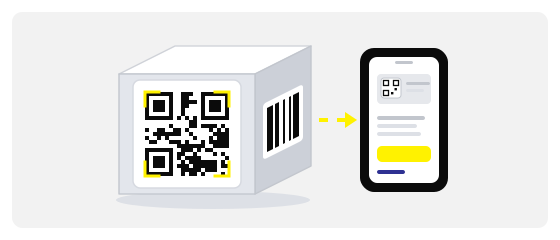
Two codes, two completely different jobs
A barcode is a number for the till. It says “this is item X” and that is where its work ends. Your phone camera cannot read it, you cannot change it later, and it knows nothing about the person holding the box.
A QR code is read by the buyer’s camera. It opens a page you control, and every visit can be counted. This is not a replacement for the barcode — it is a second layer, the one that talks to a human instead of to software.
The difference shows up in practice. A damaged barcode means the till cannot ring up the item, and that is the shop’s problem. A QR code that will not scan means the buyer never learns what you wanted to tell them. The second failure is quieter, but it costs more, because you have already paid for it in print.
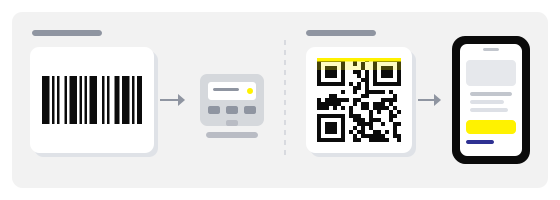
Barcode
For the shop’s systems. Identifies the product line. The customer never scans it.
QR code
For the buyer. Opens a page you control and shows you how many people came.
What pays off fastest
Three things earn their keep sooner than anything else: ingredients and origin, instructions for this exact model, and the ability to say something after the sale. The last one matters most. The packaging is already printed and sitting in a warehouse, while the page behind the code can change tomorrow morning.
Do the maths. Adding a paragraph to a label means a new print run, a new proof, new money. Adding a paragraph to the page behind the QR code takes five minutes in a browser. That is why a QR code on packaging pays for itself somewhere you might not expect: not in “engaging content”, but in the fact that you no longer have to reprint a box because one sentence changed.
There is a less obvious one too: service. People rarely write to a manufacturer about a small annoyance, but they do scan a code once the thing is at home and something does not add up. A scan at that moment is the cheapest way to learn what actually breaks in your products.
Batch, shelf life and recalls
One code for the whole product line leads to one page for everyone. A dynamic code can be pointed at a page for a specific batch — and that is exactly where you warn people about a recall before they open the box.
Keep the batch number printed on the packaging, though. A code can be scratched, covered by a shipping label, or simply not scanned. A printed number works when nothing else does, and a recall notice that waits for a scan nobody made is not a recall notice.
There is a quieter use as well. When a product is discontinued, you point the code at the successor page, and the boxes already in the warehouse still lead somewhere instead of nowhere. The same applies to shelf life: if a batch is past its date, a code that opens the current instructions at least does not leave the person alone with the question.
Where to put it on the pack
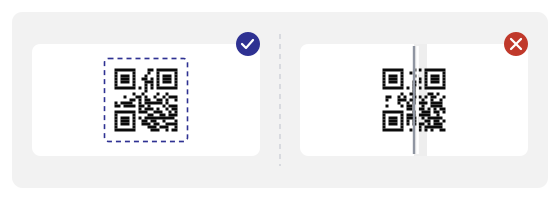
Packaging is the most forgiving surface for a QR code and the most deceptive at the same time, because you rarely control the material, the finish or the line itself.
- put it on a flat panel — not across a fold, a seam or a curve
- give it at least 2–2.5 cm on retail packaging, more on a shipping carton
- leave clear space around it; the artwork must not touch the modules
- do not put glossy laminate straight over the code — it bounces light into the camera
- add a short line: “Scan for the instructions” explains why anyone should bother
On small items the code usually ends up on the label rather than the pack itself. That is normally the right call: a label is flat, matte, and it can be moved inside the artwork without touching the print design.
A code that runs across a fold is a code half your customers will not scan.
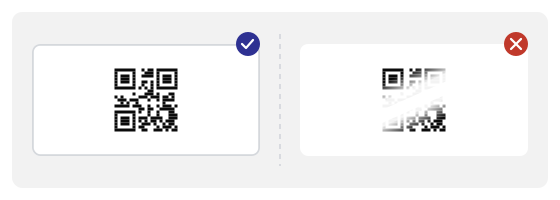
Gloss, matte and the angle people look from
The most common reason a code “is there but will not read” is not size or contrast — it is the surface. Glossy film, varnish or metallised board throws the shop’s lighting straight back into the lens. In the plant the code was checked under a ceiling light and everything was fine. In the aisle, with lamps at an angle, it becomes a white smear.
So do not proof it on a monitor. Print the code the way it will actually be printed, on the material that will actually be used, then walk it under a few light sources: daylight from a window, a warm lamp above a shelf, a cold lamp in the aisle. If it reads in all three, it will read for people.
Small fixes help: a matte patch under the code, a thin white backing, moving the code off the brightest part of the layout. And do not be shy about asking the printer for a finishing sample — they will hand you one faster than you expect.
What to write under the code
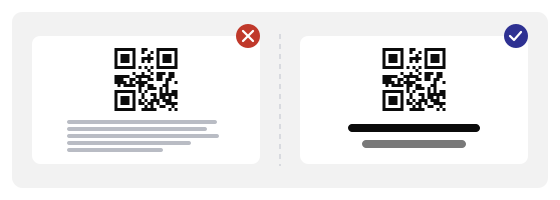
A code with no caption almost always loses to a code with one. People do not scan the unknown: they do not know where it goes, whether it is safe, or how long it will take. One line under the code answers all three questions at once.
A bad caption is a paragraph in tiny type where the word “information” appears three times. Nobody reads that, not even the people who scan. A good caption is a verb and a benefit: “Scan — we’ll show you how to assemble it”, “Scan — 40-second video”, “Scan — check the batch”.
One more thing: write the caption in the same language as the rest of the packaging, and do not set it smaller than the ingredients. If someone is already reading your label, they should be able to read this line without hunting for glasses.
A QR code works when the person understands why they should scan it. The rest is mechanics.
What production actually looks like
If the code is printed in the same run as the packaging, it lands on every unit identically — one code for the whole product line. That is the simplest and cheapest option, and it is entirely enough for instructions, ingredients and the product page.
If you need a different code per batch, or a unique one per unit, you are in variable data printing. The printer needs a file where every position carries its own code, otherwise the run stops at the first thousand. Dynamic codes keep this manageable: the codes themselves are short and identical in structure, only the destination changes.
And always ask for a physical proof on the real material before the run starts. A code approved on a PDF in a monitor proves nothing — printed on metallised film under shop lighting, it proves everything.
A word about margins: in production, artwork often gets nudged, and the code drifts towards the trim. Leave room and check how the file looks after the imposition — that is where the corner markers get clipped most painfully.

Build a page, not just a code
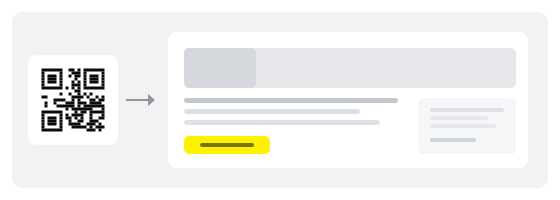
Most QR failures on packaging are not printing failures — they are destination failures. The code scans perfectly and opens the site’s home page, where there is nothing about the product in the buyer’s hand. The tab closes, and you never learn that anyone scanned at all.
The page has to answer the questions that come up while the item is in someone’s hands: what is inside, how do I use it, what if it breaks, how do I reach you. The generator makes the code in a minute; the page behind it is where the value actually lives.
Because the code is dynamic, you can start with something simple and improve it later: a video next quarter, another language, a warranty form. Nothing on the packaging has to be reprinted.
One practical detail almost everyone misses: the page has to open fast on a weak mobile connection. Someone is standing in a shop with two bars of signal, and three seconds of waiting is already a reason to close it.
The digital product passport
The EU is rolling out the digital product passport — a set of data about a product, reachable through a code. For batteries, textiles and electronics it is gradually becoming a requirement rather than a bonus. If you sell into the European market, plan the QR code on the packaging early.
The practical consequence: packaging stops being a container and becomes an entry point into structured product data. The data lives for years, while packaging lives as long as the print run. That is another argument for a code you can redirect, rather than one frozen at the moment of printing.
Exact requirements and dates differ by category, so check the rules that apply to your segment before you build a layout around them. And do not make the passport the code’s only job: someone standing in a shop wants instructions, not a compliance table.
A unique code per unit: when one is not enough
One code for the whole line is fine for instructions and bad for protection. A counterfeiter copies one code, puts it on thousands of units, and every one of them scans as genuine.
A unique code per unit sends a different signal. The first scan confirms the item is real; repeat scans of the same code say someone copied it. Two scans of one code from two countries within an hour is not statistics — it is a warning.
What it costs is not only printing, but a server that remembers which codes have already been seen. For cheap goods that rarely pays off; for cosmetics, electronics and spare parts it usually does.
And do not promise the buyer more than you can deliver. “Check authenticity” on packaging where the whole batch shares one code is a promise the code cannot keep.
How to tell whether the code works
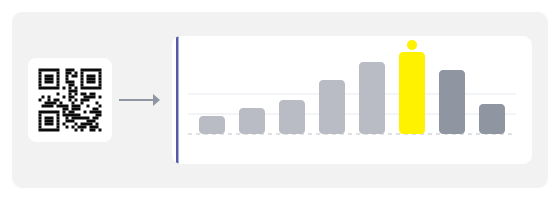
Scan analytics tell you two different things at once, and both are useful. The total shows whether people notice the code at all. The spread over time shows whether they scan on the shelf, at first use, or never.
If scans arrive in the first days after delivery, the code is being read in the shop or at unboxing. If they appear weeks later, people found it in a cupboard when they finally needed the instructions — which means the caption should say “instructions”, not “more information”.
Compare products with each other. An item with ten times the scans of its neighbour usually means a better position or a better promise, not that the product is more popular. And watch the empty page: lots of scans with no further clicks means the problem is not the code, it is what the person found when they got there.
Mistakes that cost a print run
- the code is too small for the surface — under roughly 2 cm on retail packaging
- low contrast, or a coloured code on a tinted background
- glossy film or varnish sitting directly on the code
- a border or background pattern eating into the quiet zone
- a static code pointing at a page nobody maintains
- no test on the real material before the full run
And one that is not about printing at all: a code that leads to a password-protected page or a form that demands registration. Nobody in a shop is signing up to read an ingredient list.
Where our tools fit
The generator creates a dynamic code with analytics. QR studio is where the code goes into print artwork with the right margins and exports at production resolution. And the QR scanner lets you check what is inside a printed code before the boxes leave the factory — the cheapest check in the whole process.
The order is simple: code in the generator, artwork in the studio, a check with the scanner, and only then the print run. If you want to see how it looks on a live example, start with the generator — the code, the page and the stats are all there.