
Cybersecurity & QR
How to scan a QR code safely: the two-second pause
The camera itself does nothing. Everything happens in the moment a button saying “Open” appears and a thumb is already pressing it. Safe scanning is not a complex technique, it is a habit: see what is inside the code first, decide afterwards.
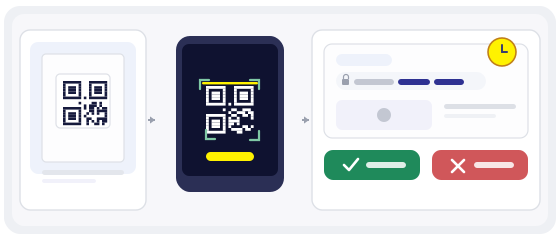
Do not want to open blind? The scanner reveals the address first.
Check a codeThe dangerous moment is not the scan, it is the tap
Nothing bad happens when you point a phone at a code. The phone reads the picture, finds an address in it and shows you a small banner. The trouble is that the banner looks identical for every code — a favourite café's page and a fake bank page get exactly the same treatment.
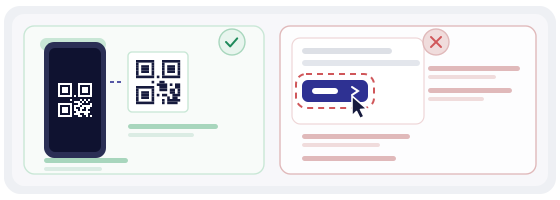
Then comes the part scammers count on: the person taps without reading. Not because they are careless. Phones are built that way — they suggest an action and quietly remove anything that might have slowed you down.
So the whole of safe scanning comes down to one habit: read what is inside first, decide second. Everything else is detail.
A QR code is a box, not a link
There is more than a web address that can sit inside a code, and every kind of content has its own trap.
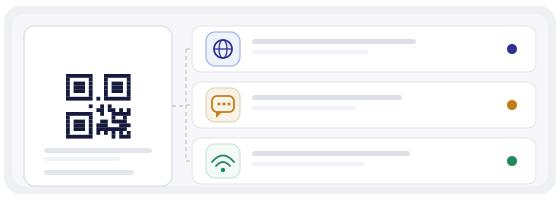
Contacts, app commands and plain text sit off to the side. They rarely do damage on their own, but they are the easiest way to plant a phone number that someone will call later.
Read the address, not the picture
The most useful skill here is looking at the domain instead of the logo. A logo can be copied onto a page in two minutes. A domain cannot.
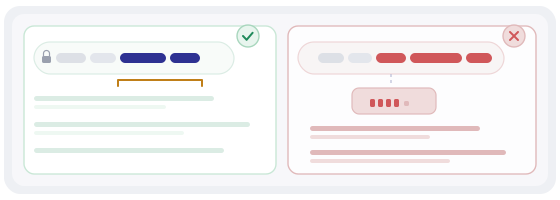
- Read the address from the right: the last two parts are what counts, everything before them is just a subdomain.
- A famous company name in the subdomain means nothing — it can sit in front of somebody else's domain.
- One swapped letter, an extra hyphen or a different ending is the standard forgery.
- The padlock only says the connection is encrypted, not that the site is honest.
- A short link hides the real address — which is exactly why people use one when they want it hidden.
An unfamiliar address is not automatically fraud. But it is a reason not to type a password there and not to pay there.
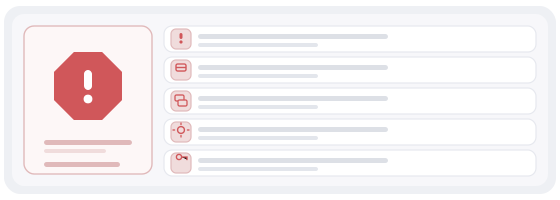
Five things that should stop you
- The code pushes: “blocked”, “fine”, “last day”, “today only”.
- After scanning you are asked for card details, a code from an SMS, a wallet recovery phrase, or a file install.
- The sticker looks foreign, or sits freshly on top of an older one.
- The page asks for permissions it has no business needing: contacts, messages, camera.
- You are asked to log into email or banking through a link rather than through the app.
If you are being hurried, that is the reason not to hurry. A calm page will still be there in a minute.
The pause that costs two seconds
The easiest way to force the pause is to stop using the camera for it. A scanner that shows the content first and only then offers to open forces you to look at the address. That is all it takes.
Our QR scanner works exactly like that: it decodes from the camera or from a photo, shows what is inside and checks the content for anything suspicious before you decide to open it. For everyday doubtful stickers that is enough.
One more detail: if you are scanning in a public place, do not keep the phone in your hand once the page has loaded. Step somewhere calmer if the page asks for anything to be typed in.
If you already tapped
It happens to everyone. What matters is not carrying on.
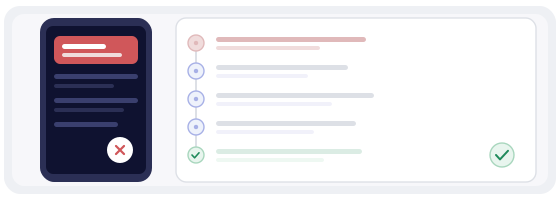
- Close the page. Do not tap “yes” on any pop-up on top of it.
- Type nothing: no password, no card number, no code from an SMS.
- If you already entered a password, change it from another device and switch on two-step login.
- Check your card activity for the last few hours. If something is wrong, call the bank now rather than in the morning.
- Warn anyone who might scan the same code: colleagues, neighbours, parents.
The worst thing you can do is stay quiet. Silence is what gives fraudsters time.
Settings that make a phone less eager
None of this is full protection, but a few minutes in settings genuinely help.
- Turn off automatic link opening in the camera, where the phone allows it.
- Do not let passwords autofill on domains you do not recognise.
- Show the full address in the browser — so you see the domain, not just a page title.
- Keep the browser updated: older versions spot fake pages less well.
- Run an ad blocker on the phone — one more layer between you and a doubtful page.
Older parents and children are the ones who get caught
The people who think least about domains tap most often. Not because they do not understand, but because what they are shown is convenience, not a check.
Do not teach a list of rules, teach one action: “look at what is inside first, then open”. Install a scanner that shows the content, and agree one simple rule — type nothing and pay nothing until you have called me. That works better than any lecture.
If you print codes yourself
Safety works both ways. People trust a code on your shopfront, and that is exactly why your job is to make it lead precisely where it promises.
Use a clear domain rather than a shortened link. Make the code dynamic so the address can change without reprinting. Do not hide payment and login behind an unnecessary hop — people should see where they are going. Build codes in the generator, lay them out in QR Studio so they read on the first try, and now and then check with the scanner where your own stand actually points today.
Try it once and the habit sticks
Take any sticker in a stairwell or a coffee shop and walk the whole path slowly.
- Scan it with the scanner and look at the content without opening.
- Read the domain out loud — problems are easier to notice that way.
- Compare the address with what the sticker promises.
- Open only if they match. If they do not, close it and forget it.
- Build your own code in the generator and check it leads exactly where you think it does.
After two or three rounds it is no longer a rule, just a habit. And that habit closes most of the stories that end with money gone.