
Useful materials
What is a QR code and how it works
A plain explanation of QR codes: what is inside one, how a phone reads it, what it can hold, and why QRcode Global only offers dynamic codes.
Want a code with your logo and stats?
Open the StudioWhat is a QR code
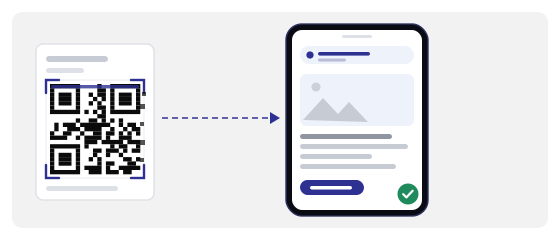
A QR code is a two-dimensional graphic code a smartphone can read with its camera. "QR" stands for quick response — the name was chosen because the code was designed to be read faster than the linear barcode it was meant to supplement.
It was invented in 1994 at Denso Wave, a Japanese automotive supplier, to track parts on a production line. A barcode could hold a short number; the factory needed something that could hold more data and survive being printed on a dirty, partially damaged label. That origin explains most of the format's design.
Today the technology is free to use and sits on almost every phone in the world without any app being installed. That combination — free, universal, and needing nothing but a camera — is why it outlasted every other attempt at "a code you scan with a phone".
- website
- menu
- Wi-Fi
- contact
- payment
- event
How it works
Under the surface a QR code is a grid of small black and white squares — modules — arranged so that a camera can read them at an angle, in poor light, and even when part of the code is damaged.
The three large squares in the corners are finder patterns. They tell the phone where the code is, how big it is, and which way up it is. This is why you can scan a code sideways or upside down and it still works, and why "beautifying" those corners breaks the code entirely.
The rest of the grid carries data plus error correction: redundant information the reader can use to reconstruct missing modules. That is what allows a logo in the middle without killing the scan — up to a point.
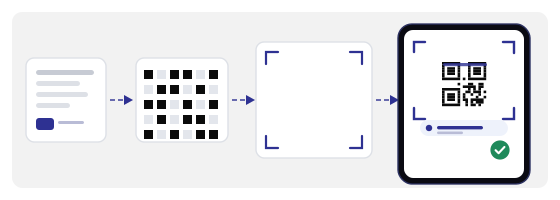
- Seethe code
- Aimthe camera
- Openthe result
From the user's side it is three steps and about two seconds. Everything clever happens invisibly.
What a QR code can hold
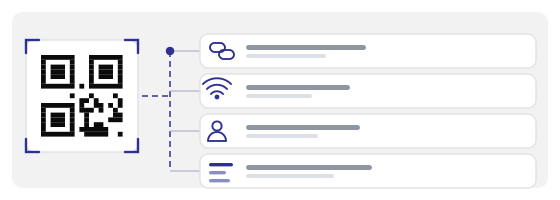
A code is a container, not a link. What it carries depends on how it was made, and the difference matters when you are choosing what to print.
Two practical consequences. First, technical content like Wi-Fi and contact cards is stored inside the pattern, so it works offline. Second, a URL can point at anything the phone's browser can display — which is where the flexibility, and the risk, both come from.
A code also has a capacity limit. Short URLs produce sparse, easy-to-scan codes; long ones produce dense codes with small modules that demand better printing and more care. This is one very practical reason dynamic codes are popular: a short redirect behind the code keeps the pattern sparse no matter how long the real address is.
Static and dynamic — the difference that decides everything
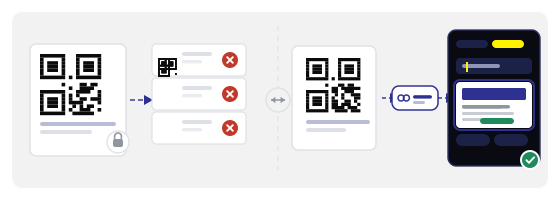
A static code has its content baked into the pattern. A dynamic code contains a short redirect, and the real destination lives on a server you control.
Dynamic
Change content after print and see scan statistics — no static compromise.
Static
Permanent, works forever, cannot be edited or measured. Simple and honest, but frozen.
We consciously rejected static QR codes: after print you cannot change them, and you get zero statistics. On QRcode Global you only get dynamic codes — change content after print and see the scans.
That is a real trade-off and worth naming. A static code has no dependency on anyone: print it, and it works until the paper falls apart. A dynamic code depends on the redirect service staying online. We think the ability to fix a mistake without a reprint, and to know whether anyone scanned, is worth that dependency — but if you want a code that can never break, a static one is the more conservative choice.
Where QR codes appear
The pattern behind all of them is the same: a physical object already in someone's hands, and a digital action that would otherwise need typing. Where typing is not an obstacle, a QR code adds a step rather than removing one.
Scanning safely
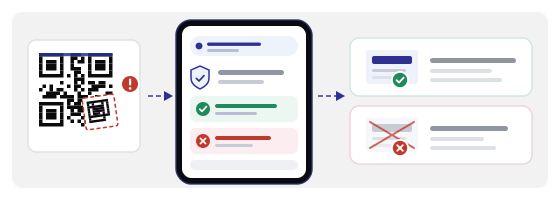
Most phone cameras now show a preview of the link before opening it. That preview is the single most useful safety feature in the whole process, and most people tap past it.
- read the address before you open it — does it match where you expect to go?
- be sceptical of codes stuck over other codes, especially on payment terminals
- ignore codes in unsolicited mail that promise an urgent payment or a refund
- never enter a password after scanning a code you did not expect to scan
- on a phone, check whether the domain is the real one and not a lookalike
The QR scanner on this site does that check explicitly: it decodes the code and shows you the content before offering to open it.
Why QR codes spread
One scan replaces typing a URL, searching for a business, and fixing a typo. That simplicity is the main advantage — and it explains why the technology survived a decade of being declared dead before becoming ordinary.
The rest is economics. Printing a code costs nothing extra once the layout exists. Changing what it points at costs nothing at all with a dynamic code. And a phone camera is already in every pocket, with no app, no account and no training required.
Making one
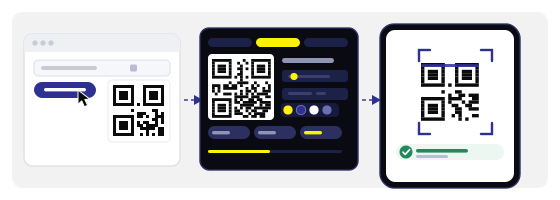
Choose the content, choose the size, export in the right format, test it, then print. The generator covers the content and export in about a minute; the QR Studio handles layouts and print-ready files when the code has to sit in a designed piece.
Before anything goes to a printer, scan the finished code with a second phone. It is a ten-second check that prevents the most expensive category of QR mistake — a print run of codes that lead nowhere.
What actually makes a code fail
Almost every "the QR code doesn't work" report traces back to four causes, and none of them is the QR format itself.
Too small for the distance. A rough rule: the code should be about one tenth of the distance from which it will be scanned. A code read from three metres needs roughly 30 cm of width, not 3 cm.
Too little contrast or the wrong surface. Dark modules on a light background is the rule; inverted colours confuse many readers. Glossy laminate, curved bottles and dark packaging all produce reflections that hide the pattern.
No quiet zone. The empty margin around the code is part of the design — crop it away in a layout and the reader can no longer find the corners.
A dense code shrunk by software. Export as SVG or a large PNG, and never upscale a screenshot. Raster codes lose the sharp edges the reader depends on.
Three myths worth clearing up
"QR codes are only for restaurants." Menus were the most visible use case, not the only one. Packaging, tickets, invoices, Wi-Fi, business cards and industrial labelling all predate the restaurant boom.
"A QR code is a link." It can be, but it can also be data with no internet involved at all — a Wi-Fi password or a contact card works in a basement with no signal.
"Any square code can be changed later." Only a dynamic one can. A static code is a photograph of data; nothing about it can be edited without printing a new one.