
Materials
Why we only make dynamic QR codes — and where static still wins
Two squares look exactly the same. The difference is not in the picture. It is in what happens a year from now, when the menu changes, the promotion ends or the site moves to a new address.
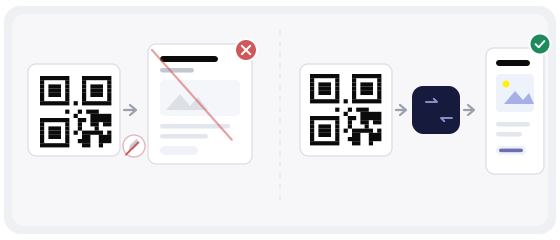
What you are really choosing between
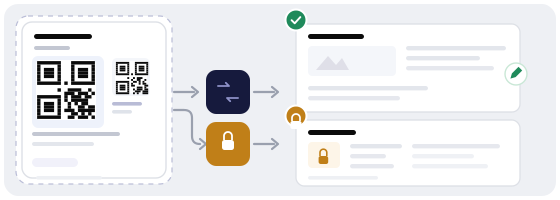
In a static code, the address itself is baked in. In a dynamic one, the square holds a short link that sends people to your page through one extra step. Everything else follows from that: one of them you can change, the other you cannot, no matter how hard you try.
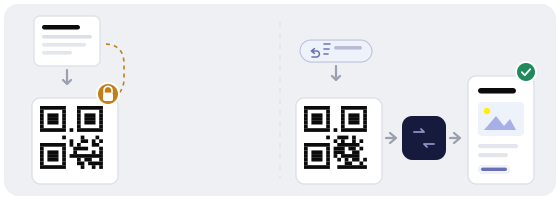
So the question is not which code is "better". The question is what you are going to do with this code afterwards — and how many times.
The honest answer: when static really is better
We are not going to pretend dynamic is always the right call. There are cases where static is the smarter choice, and it is better to say so than to sell you something you do not need.
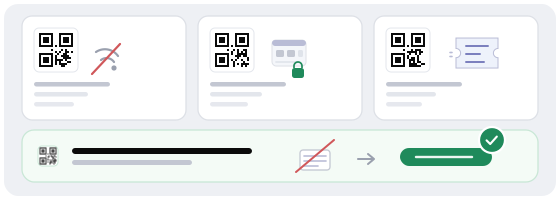
What you give up when you go dynamic
Flexibility has a price, and it is better to know the price before you pay it. This is what you actually hand over.
Three questions that settle it
Before you buy anything, answer three questions. They carry more weight than any article about QR codes.
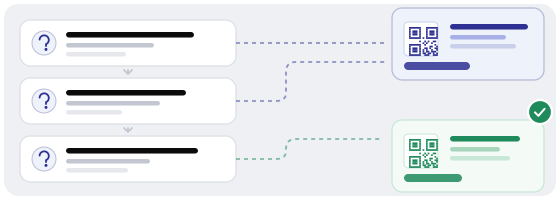
Will the destination change? If you are confident the address will live as long as the sticker, dynamic adds nothing for you.
Do you actually need numbers? If you are never going to measure anything, analytics is a feature you pay for and never open.
Is the code going somewhere with a weak signal? If it is, every extra step in the chain is a risk rather than a convenience.
Two yeses — go dynamic. Two nos — static does the job just as well, and you keep the money.
What a mistake costs, in each direction
Both options have a cost. You just pay at different moments.
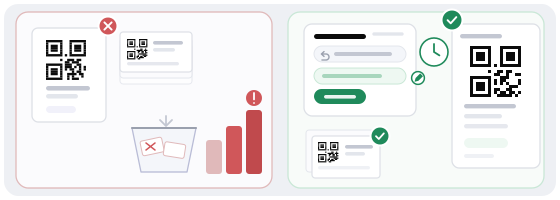
A mistake towards static
Five thousand table stickers, and the menu changes a month later. You print a new batch, strip the old one and put the new one out — in every room, in every city.
A mistake towards dynamic
The code is printed and the link points to the wrong place or has been disabled. People see a blank screen, and you hear about it from complaints, not from your dashboard.
A dynamic code can fail; a static one cannot. But a dynamic failure shows up in your dashboard within a minute, while a static mistake only shows up once the batch is already printed.
The hybrid that experienced teams use
The smartest projects do not pick one option forever. They mix, depending on what is actually hanging on the wall.
Our decision and what it costs
At QRcode Global we only make dynamic codes. That means we take part of the work off your hands — editing, statistics, pausing a campaign — but it also means you depend on a service. We think that is a good trade for a business: reprinting a batch costs more than a yearly subscription.
But we do not want that dependency to become a trap. So here is what we recommend anyway: export the list of active codes once a year and keep it on your own drive, have one person who knows the dashboard password, and never make a code the only way in — there should always be a human path underneath it.
Mistakes people make in the decision itself
- Choosing dynamic "because everyone does" while having no metric to look at.
- Printing a static code for a menu or schedule that changes every season.
- Making the code the only way into Wi-Fi, payment or a timetable.
- Ordering a large batch before checking a single printed copy.
- Never writing down who owns the link and who has dashboard access.
- Forgetting about the basement with no signal and putting a dynamic code there.
Try both in ten minutes
The fastest way to feel the difference is to make two codes and look at them through the eyes of someone scanning for the first time.
Start with the generator: create a dynamic code, then change the destination as if the menu had already been updated. The square stays exactly the same — that is what you are paying for.
Then open QR Studio and lay it out at the real printed size, with a quiet margin and a caption people can read. Before anything goes to the printer, use the scanner to see where the code really leads.